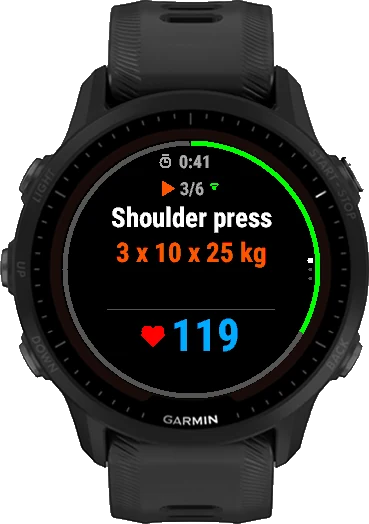
3 × 10 × 25 kg
The plan, without the kiosk.
Current exercise, target sets and loads, what is done and what is left. You can also start a workout from your program right on the watch.
Exercise, sets and loads straight from the machines. Reps counted on free weights. Your phone stays in your pocket.
Free for your first 5 workouts, then a one-time purchase. Independent app, not affiliated with Technogym or Garmin.
Ask for your code: it arrives by email within a minute. Enter it in the app settings and the 5-workout limit is gone for good. Once you have tried Spotter at the gym, an honest store review helps a lot.
Log in on any Technogym equipment and Spotter follows your Mywellness program, from the first set to the last.
3 × 10 × 25 kg
Current exercise, target sets and loads, what is done and what is left. You can also start a workout from your program right on the watch.
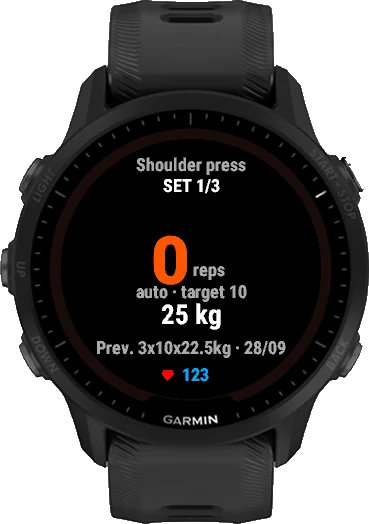
0 → 10 reps
Spotter counts reps at the wrist, detects the end of the set and saves your real sets and loads in Technogym.
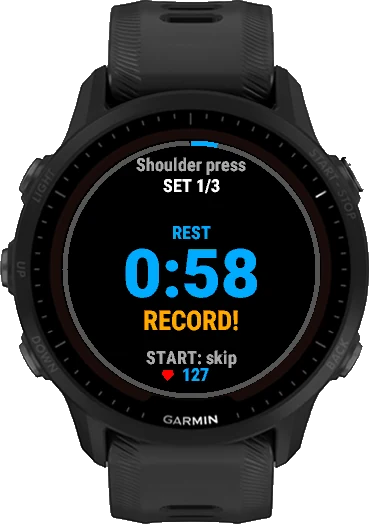
0:58
A vibrating countdown between sets, and a RECORD the moment you beat your best load.
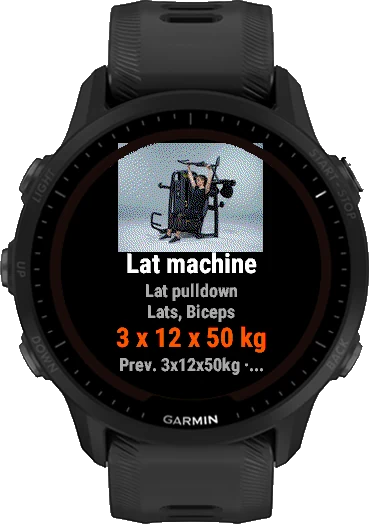
1RM · plates per side
Equipment, muscles worked, your Technogym 1RM, last time's sets and the plates to load on each side.
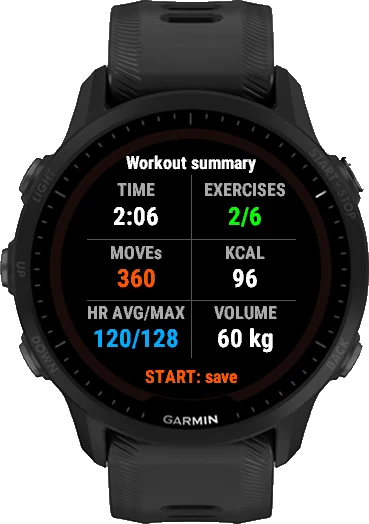
MOVEs · kcal · volume
A summary at the end, the Technogym workout closed for you, and a training activity in Garmin Connect.
Treadmill, strength machine, free weights, rest. Your watch follows along without a tap.
Want every screen? Watch the tour, under 2 minutes (recorded in the Connect IQ simulator)
Technogym and Garmin already work together, but never in the direction you need at the gym: your workout, on your wrist.
Does
Your Garmin health data (sleep, HRV, resting heart rate) shows up in the Technogym app, and the watch sends your heart rate to the treadmill or the bike.
Missing
It goes one way only: your Technogym workout never reaches the watch, and Technogym sessions do not appear in Garmin Connect.
Does
Guides your workout, keeps your history and your MOVEs.
Missing
Nothing on your Garmin: the phone comes out between every set.
Does
Counts reps, records heart rate, saves to Garmin Connect.
Missing
Knows neither your Technogym program nor the machines: loads typed by hand, nothing written to Technogym, and the same workout recorded twice.
Does
Log sets and loads on the wrist, follow a program you type in.
Missing
No link to Technogym at all: no machine, no program, no history shared with your gym.
From the Connect IQ Store, on a recent Forerunner, fēnix, epix, Enduro, Venu or vívoactive.
Your Mywellness email and password, in the app settings in Garmin Connect.
Log in on a machine or pick a workout on the watch. Spotter follows along.
The watch signs in to Technogym itself. The Spotter relay only receives a one-hour token and your gym's ID, reads and updates your workout and stores nothing.
Holds your password. Signs in to Technogym directly.
Reads and updates the workout. Keeps no token, no workout.
Your program and your machines, as usual.
passwords sent to the relay
lifetime of the only token the relay sees
workouts or tokens stored by the relay
Free
Every feature. No account to create, no card.
$2.49
One purchase in the Connect IQ Store unlocks every watch on your Garmin account. US price before tax: the store shows the price for your country.
The exact list is on the store listing.
No. Spotter is an independent app, not affiliated with Technogym S.p.A. or Garmin Ltd. Technogym, Mywellness and MOVEs are trademarks of Technogym.
It never leaves your watch: the watch signs in to Technogym directly. The relay only receives a one-hour token and your gym's ID, reads your workout and stores nothing, neither the token nor your workouts.
Keep it with you, in a pocket or a bag nearby: like every Connect IQ app, Spotter reaches the internet through the Garmin Connect app on your phone. You never need to take it out.
Not yet: those accounts have no password. Set one in the Technogym app (Profile, Account), then use it in Spotter.
Forerunner 165, 255, 265, 570, 955, 965 and 970, fēnix 6 Pro, fēnix 7 to 9 and fēnix E, epix 2 and epix Pro, Enduro 3, Venu 2 to 4, Venu Sq 2, Venu X1 and vívoactive 5 and 6. Older models (Forerunner 245, 745, 945, fēnix 6 and 6S, Venu, vívoactive 4) cannot buy apps in the Connect IQ Store, so Spotter is not offered on them. The exact list is on the store listing.
The first 5 workouts are free. Then a one-time purchase in the Connect IQ Store ($2.49 in the US before tax, 2.99 EUR in France, the store shows the price for your country) (Connect IQ app on your phone, Spotter page, purchase button) unlocks unlimited workouts on every watch of your Garmin account.
Yes. When you change the load or the number of sets on the watch, your real sets (reps and load) are saved in your Technogym workout and the exercise shows as done with changes. Otherwise it is marked done with the planned sets.
With the buttons, without a long press: START does the action written at the bottom of the screen (start, set done, skip the rest, finish), UP and DOWN change the page or adjust reps, load and time, BACK opens the exercise menu: resume, weight, undo set, finish or skip the exercise. On free weights, the watch vibrates at each rep and ends the set at the planned count. On a machine, START also lets you pick the exercise you are doing. On touchscreen watches (Venu, vívoactive), swipe instead of UP and DOWN.
The watch vibrates and shows the workout summary. Press BACK: the Garmin activity is saved and the app closes.
Start the exercise on the watch: each step counts down with the level or power to set on the machine, and the next one is shown in advance. A connected machine handles all of this by itself.
I wanted to follow my Technogym workouts from my watch. I looked: it did not exist. So I built it. If Technogym ever wants to support it officially, I will gladly hand it over.
The maker of Spotter
Free for your first 5 workouts.